 Clash Verge Rev
Download Clash Verge Rev
A modern Tauri GUI client built on the Mihomo (Clash Meta) core
Download Clash Verge Rev installers here: the same release is offered via GitLab, a mirror, and the official release page for Windows, macOS, and Linux. The client is free and open source. You must import your own subscription; this site does not provide proxy nodes.
Go to downloads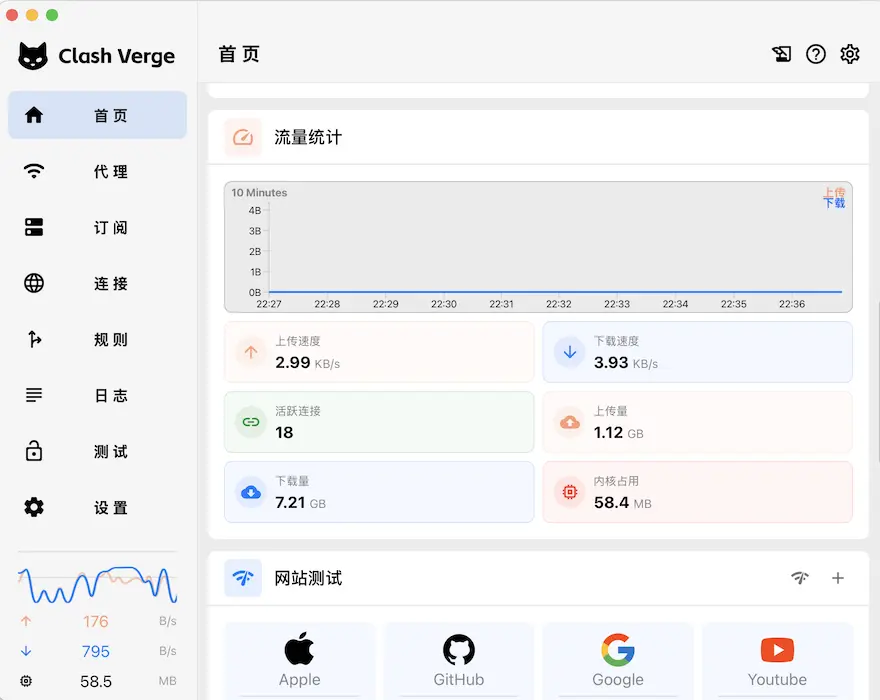
Choose Your Platform
Installers match the official release. GitLab and the mirror help when that page is slow; the third channel is the official asset URL. If you are unsure about CPU architecture, pick x64. Windows 7 is no longer supported. Mirrors only speed up transfer; they do not modify the package.
How to pick a download channel
GitLab
Use this when the official release page is unreachable. Covers x64 Windows exe and macOS dmg builds.
Mirror
Official release files fetched through an acceleration proxy. Helpful on restricted or slow networks.
GitHub
Official release source, including ARM64 and the full file list. Open Releases to verify assets.
Windows
Windows 10/11 (x64 and ARM64)
macOS
macOS 12+ (Apple Silicon and Intel)
Install Clash Verge Rev by OS
After you download the matching architecture, follow the steps below. For rpm, AppImage, or other formats, pick files on the official release page. Optional package-manager commands come from community channels; if they fail, use the official installer instead.
Windows
- Most PCs need the x64 installer. Do not download ARM64 unless you know you have an ARM machine.
- Current releases no longer support Windows 7. Use Windows 10 or 11.
- If the window never opens, WebView2 is often missing. Install Microsoft Edge WebView2, or grab the larger fixed_webview2 build from Releases.
- You can also install the stable build with WinGet (community manifest; fall back to this page or the official installer if anything breaks):
winget install ClashVergeRev.ClashVergeRevmacOS
- Requires macOS 12 or later. Use the aarch64 dmg on Apple Silicon and the x64 dmg on Intel.
- Open the dmg and drag the app into Applications. If Gatekeeper blocks it, allow this app once in Privacy & Security.
- Quit any running older copy before overwriting it, so two versions do not corrupt each other.
Linux
- This page ships the common Debian/Ubuntu deb packages. Fedora/RHEL rpm files are on the official release page.
- Clash Verge Rev is a WebView GUI and needs a desktop session. It is not a headless CLI core.
- After downloading the deb, install it from a terminal (replace the filename with the version you downloaded):
sudo apt install -y ./Clash.Verge_2.5.2_amd64.debWhat is Clash Verge Rev?
Clash Verge Rev is a free desktop proxy client built with Tauri and the Mihomo (Clash Meta) core for Windows, macOS, and Linux. It continues Clash Verge after Clash for Windows and the original Clash Verge stopped shipping updates. When people say Clash Verge today, they usually mean Clash Verge Rev. You must bring your own subscription URL. This site only hosts installers and does not provide proxy nodes.
Mihomo Core
Ships the Clash Meta (mihomo) core and can switch to the Alpha core for testing. Built on Rust and Tauri 2 for fast startup and low overhead.
Modern UI and Themes
Clean light and dark UI with custom theme colors, proxy-group and tray icons, plus CSS Injection for deeper styling.
Broad Protocol Support
Works with Shadowsocks, VMess, Trojan, VLESS, Hysteria2, TUIC, and more. It is a rule-based proxy GUI, not a one-click commercial VPN.
Merge and Script Profiles
Manage multiple subscription profiles with Merge and Script overrides, syntax hints, and scheduled subscription updates.
System Proxy and TUN
System proxy with a guard to keep the setting on, plus TUN (virtual NIC) to capture device traffic. Edit nodes and rules visually.
WebDAV Config Sync
Back up and sync configs over WebDAV so rules and subscriptions move between PCs. Data stays on your device and your own storage.
Version 2.5.2
Released on July 19, 2026
This page serves the Stable installer for daily use. AutoBuild is a rolling channel and may include unfinished work; get it from the official release page if you need it.
What's New
From install to a working proxy
Clash Verge Rev does not include servers. Once you have your own subscription URL, follow these five steps.
Download and install
Pick your OS and architecture above. Prefer GitLab or the mirror on slow networks, or use the official direct link. Open the app once to confirm the main window renders.
Import a subscription URL
Open Profiles, paste your subscription URL, and save. Clash Verge Rev will fetch the node list. This site does not sell subscriptions; use a source you already have or host yourself.
Update the profile
Run an update after import and check that nodes appear. Enable scheduled updates so rules do not go stale. On 401 errors or a corrupted profile, clear the config directory from Settings and retry.
Enable system proxy or TUN
Turn on system proxy for apps that honor OS proxy settings (most browsers). Use TUN (virtual NIC) when terminals or other apps bypass that setting. Do not stack both modes blindly.
Test latency and pick a node
Run delay tests in a proxy group and select a healthy node. Rule mode routes by domain. If one site fails, inspect rules and the active node before reinstalling the client.
Trusted by Thousands of Users
Frequently Asked Questions
What is the difference between Clash Verge and Clash Verge Rev?
Clash Verge Rev is the community continuation after the original Clash Verge stopped shipping updates. It keeps fixing bugs and tracking the Mihomo core and new protocols. Desktop Clash Verge today usually means Rev.
Is this the official website? Where do the installers come from?
This is a multi-channel download page for GitLab, mirror, and official direct links. It is not the upstream project homepage. Official builds still come from the upstream Releases. Use the repository and docs site for documentation and support.
Is Clash Verge Rev free and open source?
Yes. It is licensed under GPL-3.0. You can read the source and contribute in the upstream repository. Free refers to the client; connectivity depends on your own subscription. This site does not sell nodes.
What is the difference between GitLab, Mirror, and the official channel?
All three buttons point at the same versioned installer. The official channel is the upstream release page. The mirror fetches the same files through an acceleration prefix. GitLab hosts spare x64 packages. Use GitLab or the mirror when the official page is blocked.
Which operating systems are supported, and how do I pick architecture?
Windows 10/11 (x64 / ARM64), macOS 12+ (Apple Silicon / Intel), and Linux (deb and more). Most Intel/AMD PCs want x64. Get Linux rpm or AppImage files from the official release page.
The app will not open after install. What should I try?
On Windows this is often the wrong architecture or a missing WebView2 runtime. Switch to x64, install WebView2, or use the fixed_webview2 build from Releases. On macOS, require version 12+ and allow the app once in Privacy & Security.
How do I import a subscription? Do you provide nodes?
Paste the subscription URL in Profiles, save, then update. Clash Verge Rev is only a GUI client and needs your own subscription or self-hosted nodes. This site ships installers only and does not sell proxy service.
How is system proxy different from TUN mode?
System proxy covers apps that honor the OS proxy (most browsers). TUN uses a virtual NIC to capture more traffic, including terminals that ignore system proxy. Verify the subscription with system proxy first, then enable TUN if you need it.
Antivirus flags the app or the core file is missing?
Some security tools quarantine proxy cores or helper services. Allowlist the install folder and restore files from quarantine. Do not download cracked copies from unknown sites. If it stays broken, uninstall cleanly and reinstall the Stable build from this page.
Is there an Android or iOS app? How do I report bugs?
Clash Verge Rev is desktop-only for now. On Android, Clash Meta for Android also uses Mihomo. On iOS, clients such as sing-box are common. Search project Issues before opening a new bug or feature request.